
No Commission Fees
The Most Powerful Tour Booking Software... without the High Cost
Try 30 days for free. Tripcart charges no commissions or booking fees. Plus, all plans include hosting.
MonthlyYearly Save up to 26%
Price in USD
Growth is for you if:
- You are a solo tour entrepreneur or have just started your tour business.
- You are looking for an affordable and easy way to build a tour booking website – booking engine included.
- You want to receive payments from all over the world using trusted payment gateways.
Accelerate is for you if:
- You are a tour operator looking to grow revenue and increase bookings.
- You want to upsell your tour offerings and raise the Average Order Value (AOV) with upselling tools.
- You want to attract more customers by offering discounts and extra services, helping increase conversions.
Scale is for you if:
- You manage a large team and need powerful tools to assign roles, control access, and keep your staff working in sync.
- You want to customize your website to better reflect your brand by removing the ‘Powered by Tripcart’ text in the site’s footer.
- You need more storage space for your media as your tour business grows.
Need help deciding which plan fits you best? Take a look at all the features each plan offers to make the perfect choice.
All plans auto-renew. You’re free to upgrade, downgrade, or cancel your subscription anytime.
Growth
Accelerate
Scale
Features
Website Design & Optimization
Use Your Own Domain
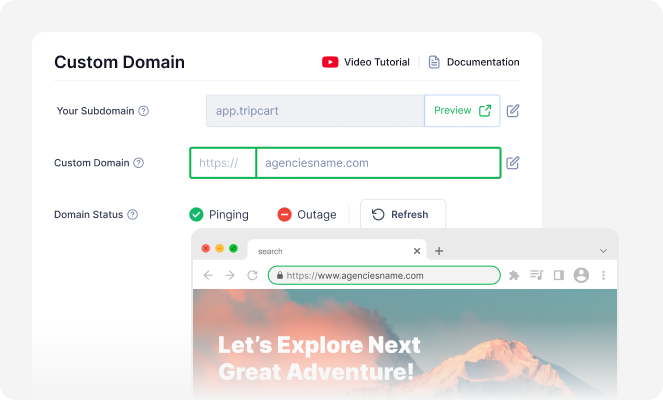
Use Your Own Domain
With Tripcart, you can use your own domain so that customers see your own web address, like yourcompany.com, instead of a Tripcart subdomain. It’s a simple way to boost your online presence and look more established.
Hosting Included
Hosting Included
Tripcart takes care of hosting for you. No setup, no extra cost. Enjoy a website that is fast, secure, and always online, so you can focus on running your tour business instead of managing servers.
Easy-to-use Website Builder
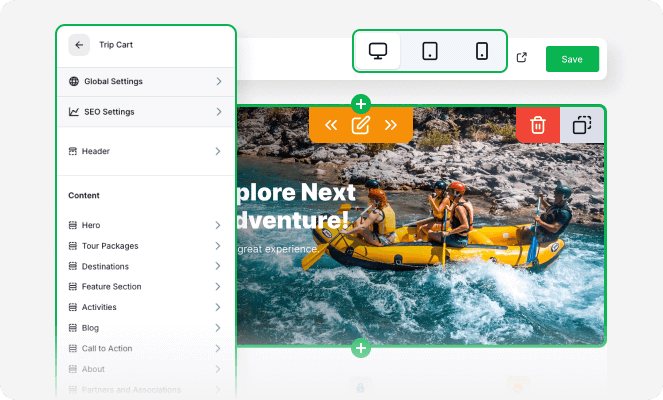
Easy-to-use Website Builder
Create your tour booking website in minutes using Tripcart’s website builder. You can customize how your website looks and feels. The easy-to-use interface allows you to make sure that your website reflects your brand and vision.
Media Gallery
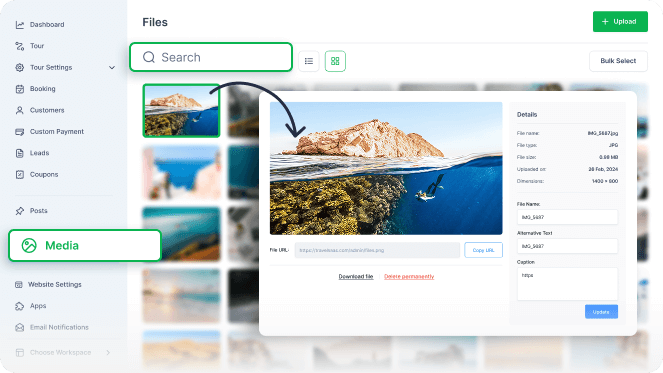
Media Gallery
Upload and manage all your tour images from a single place. Supports PNG, JPG, and WEBP image formats.
Tour Page Customization
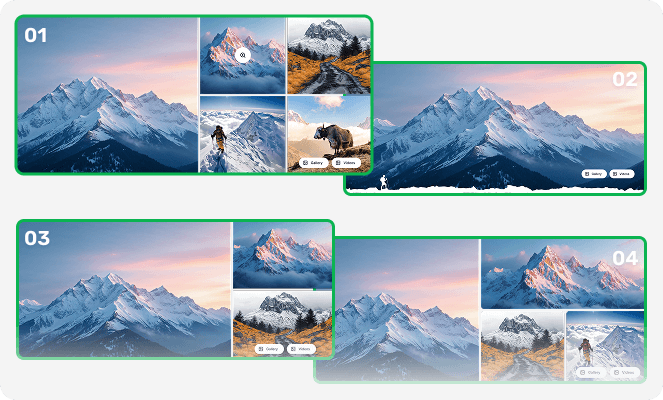
Tour Page Customization
Make your tour pages attention-grabbing with customizable banner layouts. Choose from multiple design options to help your tours create the best first impression.
Premade Design Templates
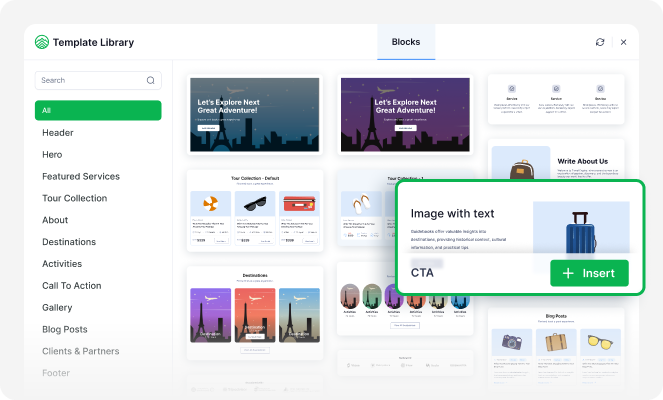
Premade Design Templates
No need to start from scratch. Create your website with easy-to-use templates that look polished and professional. Perfect if you’re short on time and don’t have a designer.
Color Customization
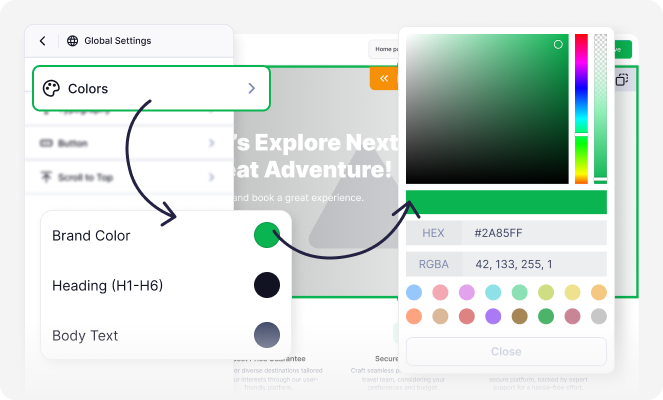
Color Customization
Match your website colors to your brand. No coding needed! Just pick and apply!
Typography Settings
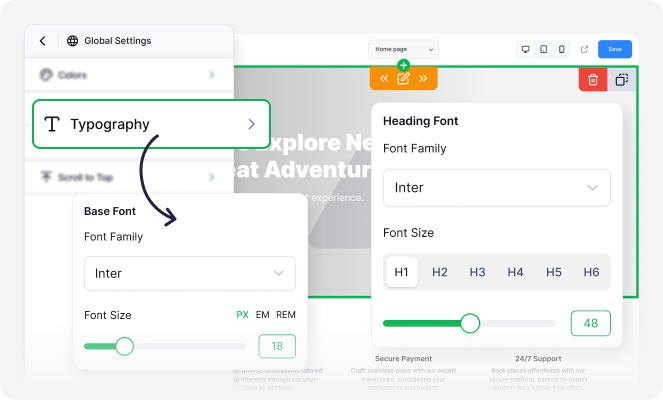
Typography Settings
Get complete control over how your website text looks and feels. Choose from over 1600 Google Fonts, adjust font size, weights, and spacing for headings, body, text, and buttons.
Mobile Responsive Design
Mobile Responsive Design
Tripcart sites are designed to be mobile-responsive. This means your website will look great and work smoothly on any device, phone, tablet, or desktop. No matter how travelers find you, their booking experience stays the same.
Navigation Menu Management
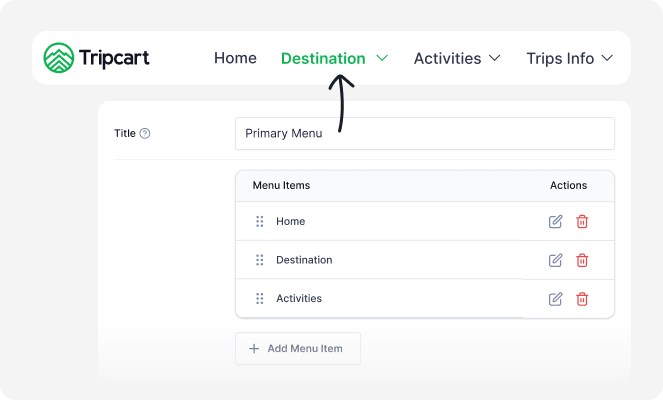
Navigation Menu Management
Set up and organize the main menu of your website. Add links to important pages like Tours, Destinations, Contact, and more, so visitors can move around your site easily.
Custom Site Pages
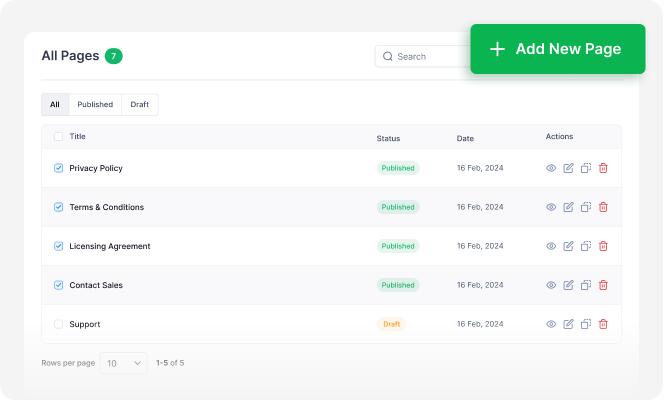
Custom Site Pages
Create and manage important pages such as Privacy Policy, Terms & Conditions, or any other page you may need. Keep your site organized, professional, and up-to-date.
Integrated Blog Posts
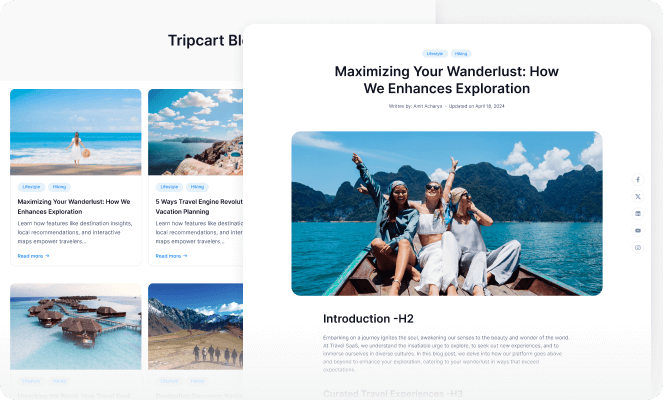
Integrated Blog Posts
Start your travel blog to share stories, tips, or guides to help alongside your tours. This is great for SEO and building trust with your audience.
Social Media Integration
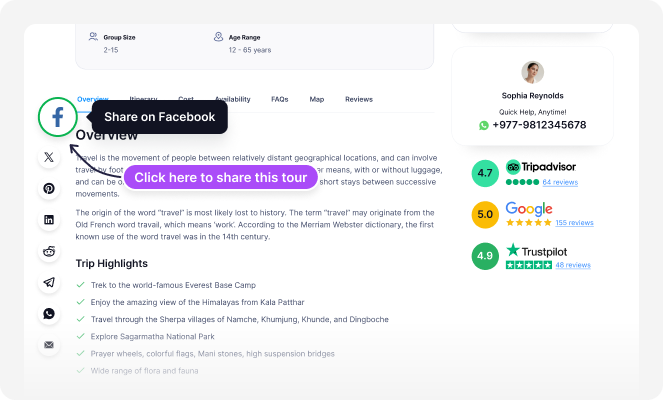
Social Media Integration
Add your social links and let users share your tours on popular platforms like Facebook, Instagram, X, Reddit, etc.
Media File Storage
Media File Storage
Each plan comes with its own storage limit for your images. You can safely upload and manage photos without slowing down your site. Need more space? Just upgrade your plan as you grow.
10 GB
20 GB
40 GB
Custom Scripts
Custom Scripts
Want third-party tools like Google Analytics and chat widgets on your website? Insert small code snippets to add more functionality to your site. This is helpful if you want to add external tools to your website.
Custom CSS
Custom CSS
Want more control over how your site looks? Add your own styling to change fonts, colors, layouts, and more – so your website matches your brand.
Alert/Notice Banner
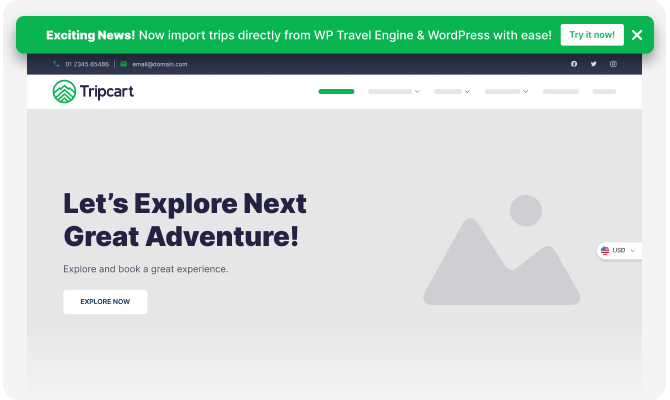
Alert/Notice Banner
Grab user attention with the alert banner at the top of your website. You could feature essential news, offers, or other vital information.
WordPress Website Migration
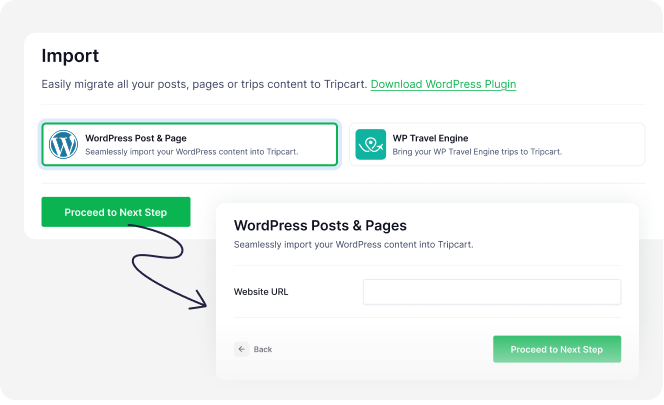
WordPress Website Migration
Easily migrate WordPress posts, pages, and tours created using WP Travel Engine into Tripcart. Save time and effort while keeping all your valuable content intact after migration.
If you have any questions about migrating, contact our customer support team.
White Label (Remove ‘Powered by Tripcart’)
White Label (Remove ‘Powered by Tripcart’)
Remove “Powered by Tripcart” from the footer of your website.
Tour & Itinerary Design
Create Unlimited Tours
Create Unlimited Tours
Offer as many activities or multi-day tours as you like. No limits!
Single-Day & Activity Tours
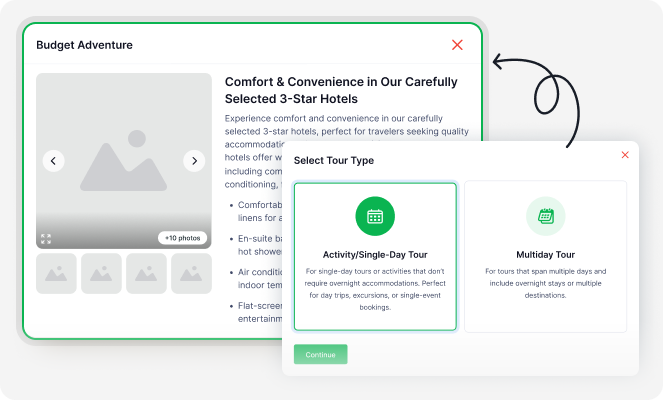
Single-Day & Activity Tours
Create and manage short tours like city walks, bike rides, cooking classes, or ferry trips. You can add hour-by-hour itineraries, include optional services, and offer discounts. It’s a simple way to offer flexible, quick-booking experiences for your travelers.
Multi-Day & Long Tours
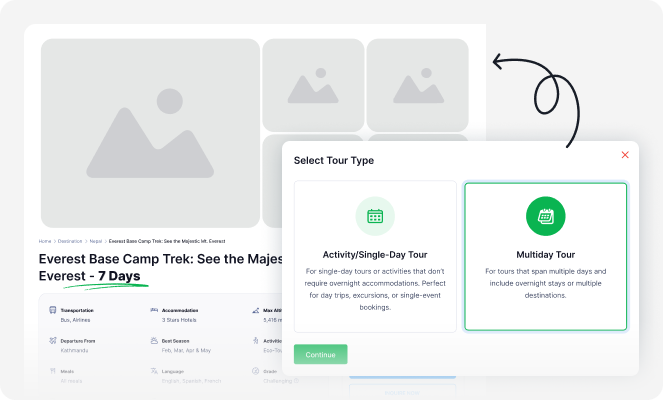
Multi-Day & Long Tours
Create and manage long, multi-day tours like adventure and outdoor tours, cruises, or other specialty tours.
Create Unlimited Itineraries
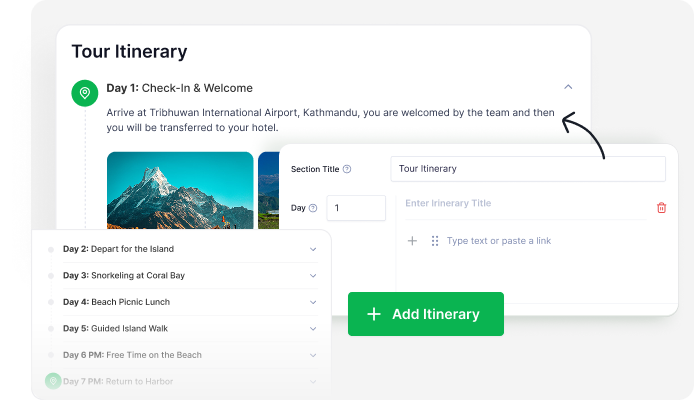
Create Unlimited Itineraries
No limit to the number of itineraries for your tours. Create the most detailed and engaging travel plans that customers can visualize and experience before booking.
Tour Departure Dates
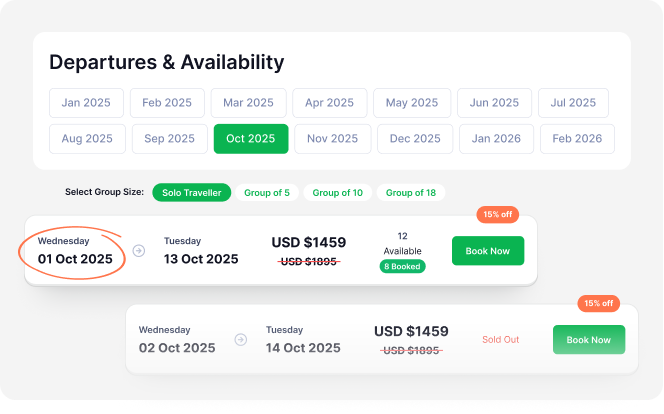
Tour Departure Dates
Set specific departure dates for your tours to optimize resource allocation and booking schedules. You can set bookable dates, create recurring schedules, and restrict bookings for particular dates.
Booking Block Dates
Booking Block Dates
You can block dates when you don’t want to accept any bookings, such as holidays, maintenance days, or fully booked periods. It helps you avoid overbooking and stay in control of your schedule.
Booking Cut-off Time
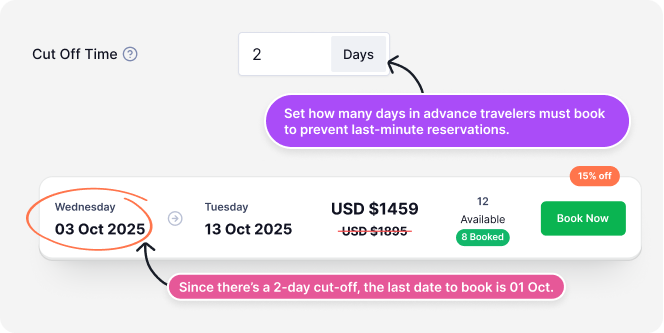
Booking Cut-off Time
Choose how early bookings must be made before a tour starts, like a few hours or days in advance. This gives you enough time to prepare and avoids last-minute bookings.
Category-Based Pricing (Adult, Child, Boat, Car, Couple)
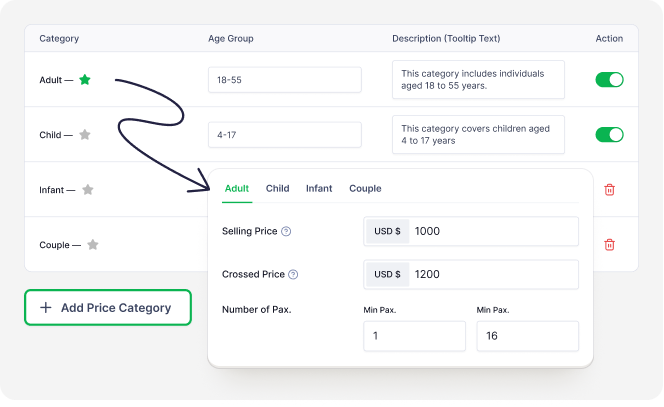
Category-Based Pricing (Adult, Child, Boat, Car, Couple)
Set different prices based on who or what you’re charging for, such as adults, children, couples, or vehicles (e.g., car, boat, jeep).
Whether it’s a group tour or a private trip, you can adjust the pricing to fit the type of tour you offer. This gives you full control over how your tours are priced.
Regular & Seasonal Price
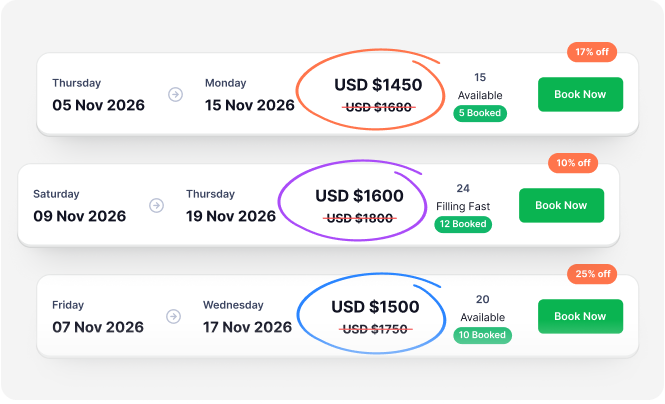
Regular & Seasonal Price
Set rates based on seasonality and demand. Differing rates during peak, off-season, or festive periods help you to grow your revenue.
Currency Settings
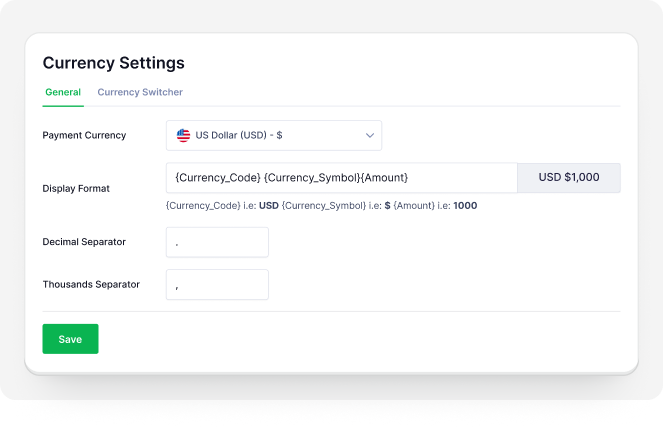
Currency Settings
Set the default currency you want to show on your website for all tour prices. You can pick a local or international currency that suits your customers. This makes prices easier to understand and helps build trust with travelers, so they’re more likely to book.
Cost Includes & Excludes
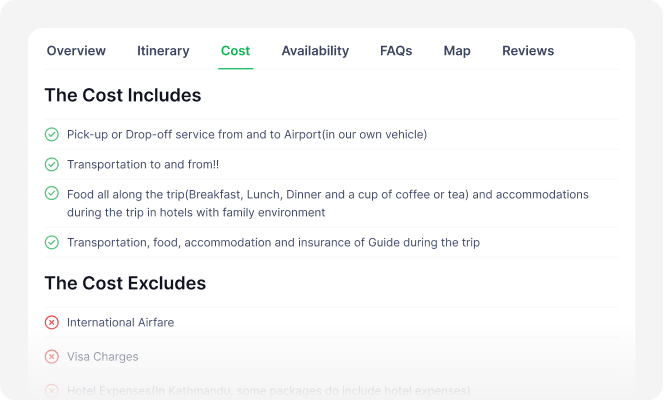
Cost Includes & Excludes
List what’s covered and what’s not, such as transportation, tickets, gear, etc. This makes your tour package prices transparent and reliable.
Tour Search Categories
Tour Search Categories
Help travelers find the right tours faster by organizing your offerings into clear categories. You can group tours by destination, type, duration, or any other custom filter. This makes browsing easier and improves the overall booking experience.
Tour Labels
Tour Labels
Highlight your tour’s key aspects with a unique label, such as “Limited” or “Best-Seller”.
Tour Difficulty Rating
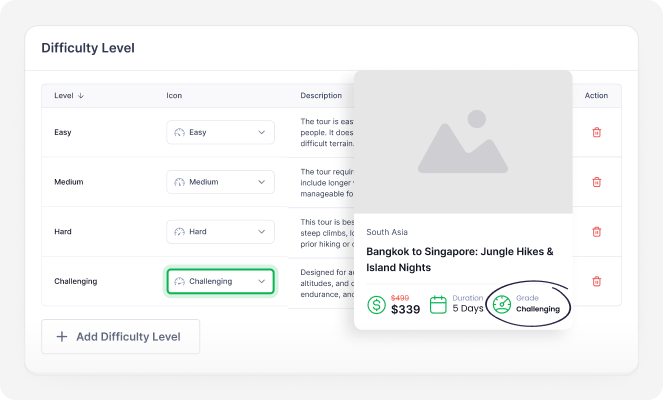
Tour Difficulty Rating
Show how easy or challenging a tour is. This helps guests pick what’s right for them.
Altitude Chart
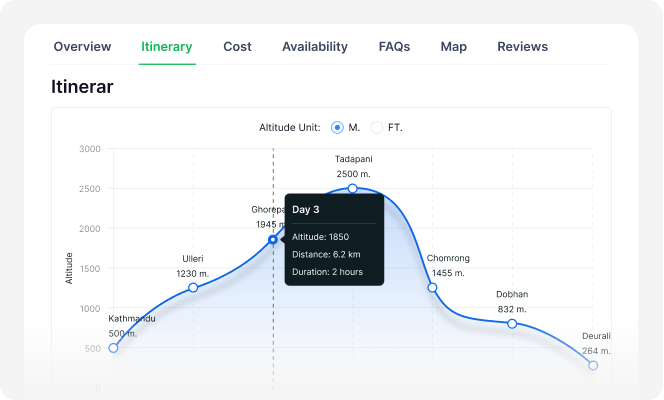
Altitude Chart
Show elevation changes on trekking or hiking tours so travelers can prepare properly.
Customizable Itinerary Info
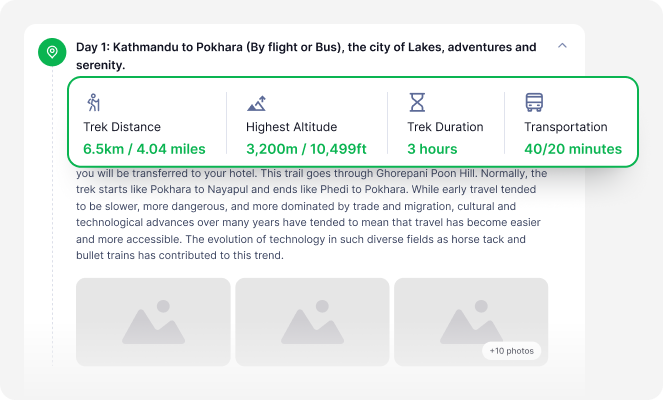
Customizable Itinerary Info
Share extra tour details about the tour, like major stops, attractions, or any other interesting tour information. Whether it’s a tour that spans a few hours or several days, travelers get a full view of what to expect.
Maps
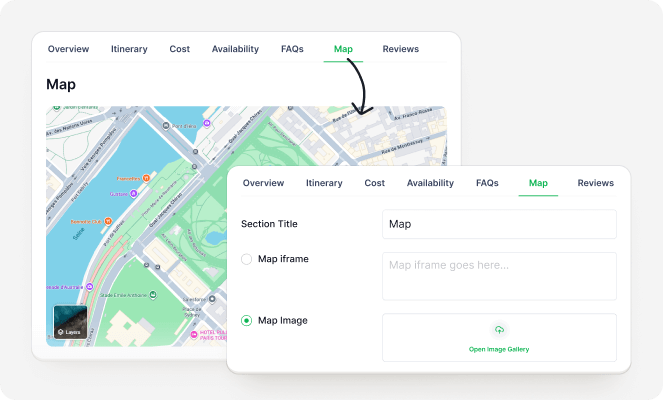
Maps
Upload custom map route images or add maps to your tours. This allows guests to visualize where the tour goes.
Currency Switcher
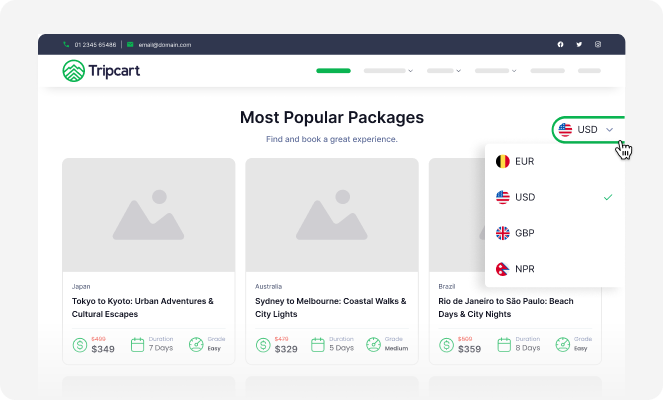
Currency Switcher
Make it easier for international travelers to understand your pricing. The currency switcher shows tour prices in their local currency using up-to-date exchange rates.
Custom Payment Link
Custom Payment Link
If you offer customized or private tours, you can create a unique payment link for each customer. Just fill in the details, set the amount, share the link, and let them pay securely. It is a quick and easy way to handle payments for one-off or tailored bookings.
External Booking Links
External Booking Links
You can make booking easier by linking your tour pages directly to other local payment gateways, such as WeTravel. Travelers can go directly to an external payment page and confirm their bookings.
Grow Revenue
Accommodation Upgrades
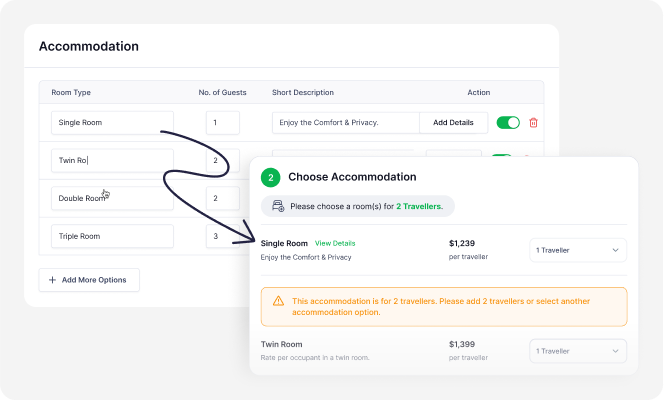
Accommodation Upgrades
Add different room options to your tours, like shared, standard, deluxe, or private stays. Travelers can choose to upgrade their stay while booking. It gives them more comfort and helps you earn extra income from each booking.
Deposit/Upfront Payments
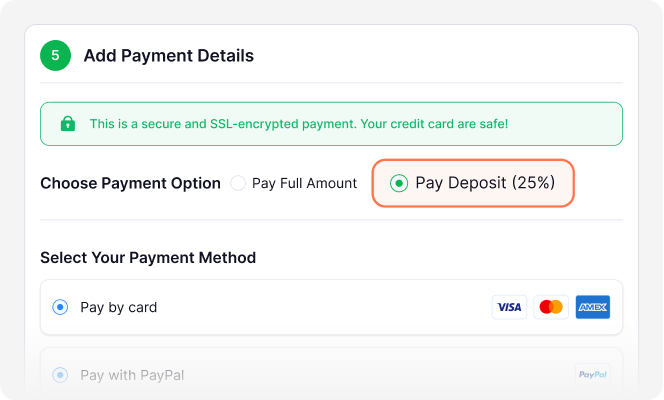
Deposit/Upfront Payments
Collect a partial or upfront payment at the time of booking. It secures the booking, reduces cancellations, and improves your cash flow.
Single & Multi-Packages
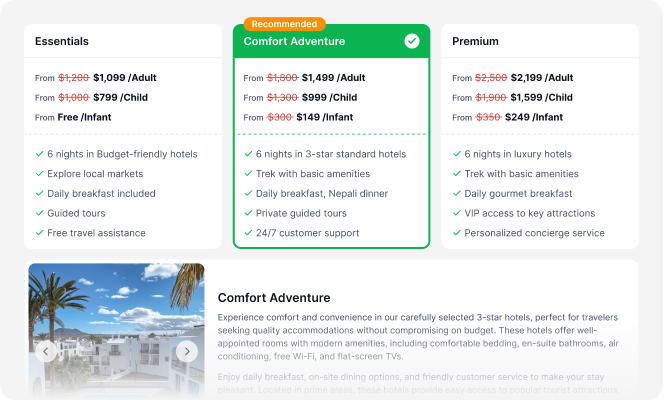
Single & Multi-Packages
Increase the likelihood of travelers booking your tours by offering various price options for the same tour. You can create Basic, Standard, or Luxury packages for the same tour so that travelers can book their preferred package.
Traveler Fees
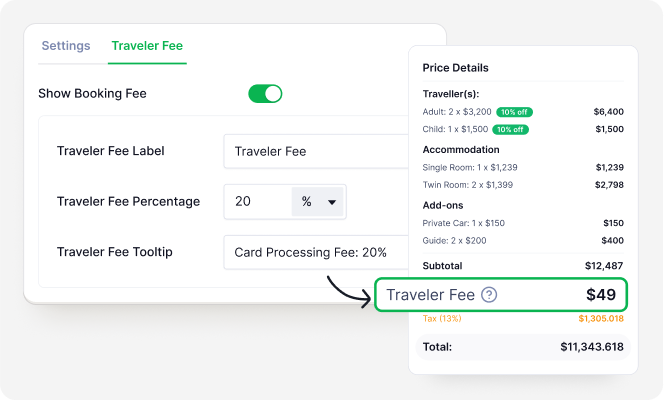
Traveler Fees
You can increase your revenue by adding small extra fees to each tour. These fees do not change your main tour price but still help grow your revenue. You can use them for expenses such as payment gateway fees, service charges, convenience fees, or other additional costs.
Promo Codes/Coupons
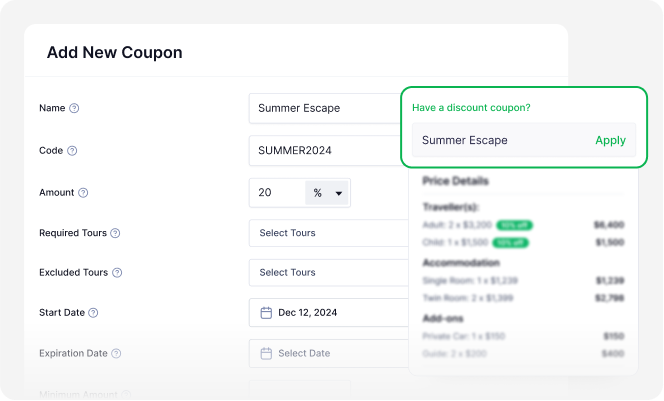
Promo Codes/Coupons
Attract more travelers to your tours with discount coupons and offers. Whether it’s early-bird discounts, year-end offers, or seasonal deals, you can easily create and share promo codes. These can be used for either specific tours or site-wide promotions.
Custom Payment Link
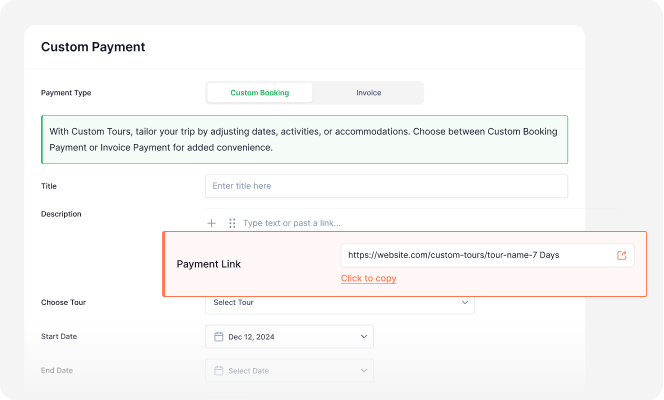
Custom Payment Link
If you offer customized or private tours, you can create a unique payment link for each customer. Just fill in the details, set the amount, share the link, and let them pay securely. It is a quick and easy way to handle payments for one-off or tailored bookings.
External Booking Links
External Booking Links
You can make booking easier by linking your tour pages directly to other local payment gateways, such as WeTravel. Travelers can go directly to an external payment page and confirm their bookings.
Currency Switcher
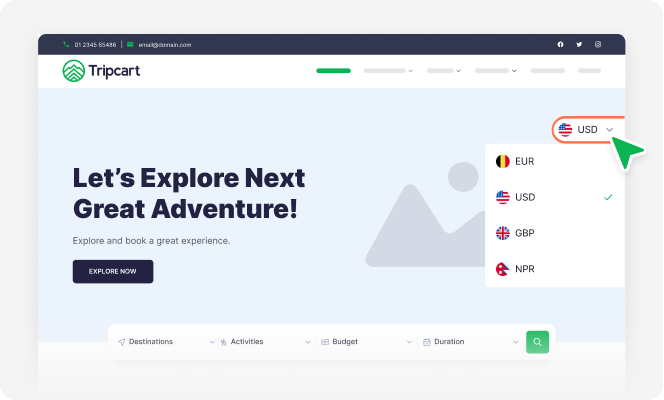
Currency Switcher
Make it easier for international travelers to understand your pricing. The currency switcher shows tour prices in their local currency using up-to-date exchange rates.
Abandoned Cart Recovery
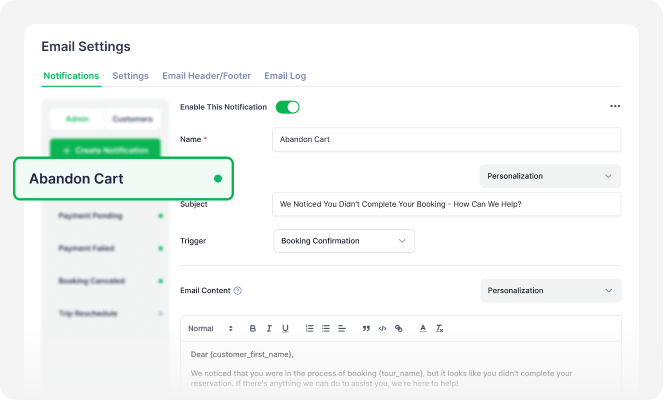
Abandoned Cart Recovery
If someone starts booking a trip but doesn’t finish, you can send them a reminder to come back and complete it. This helps you recover lost bookings and increase your sales without extra effort.
You (as the admin) will also get a notification with the customer’s contact details, so you can follow up directly and help them complete their booking.
Add-ons & Extra Services
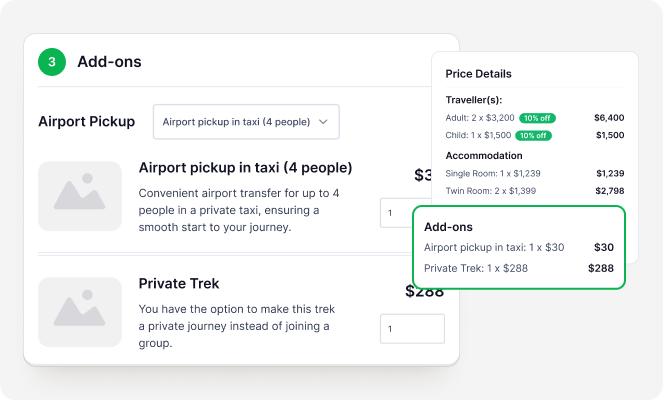
Add-ons & Extra Services
Grow revenue with optional add-ons that travelers can include with their booked tours. They can easily add airport pickups and drop-offs, private guides, extra tickets, and more. This allows you to upsell your tours and increase revenue.
Travel Insurance
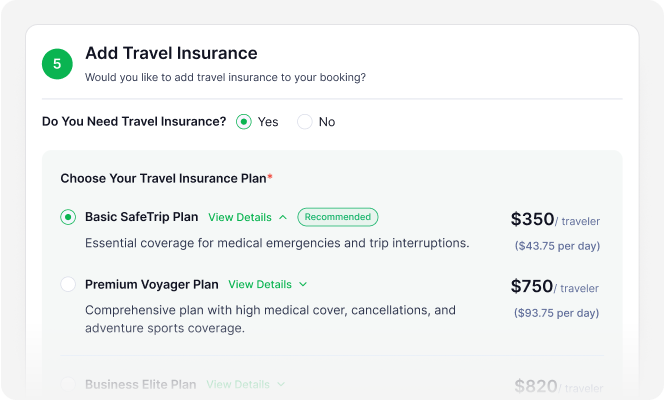
Travel Insurance
Give travelers peace of mind by offering insurance options during booking. You can create multiple coverage packages or link to trusted external affiliates and partners. Travelers stay protected, and you earn extra revenue from each sale.
Group Discounts
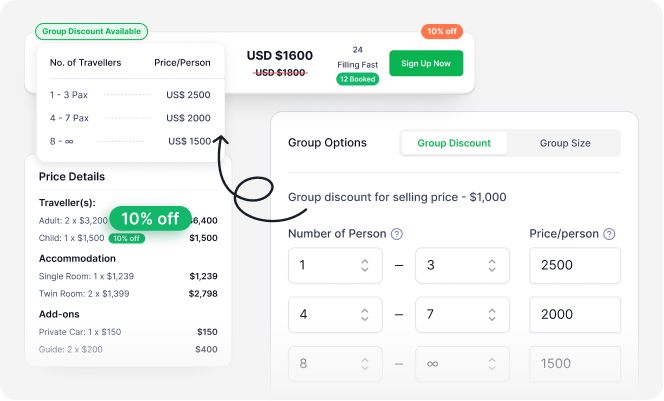
Group Discounts
You can attract more group bookings by offering discounts based on the number of travelers. This helps fill up your tours faster and increases your revenue per tour. It also makes your packages more appealing to families, friends, and travel groups.
Set Group Size
Set Group Size
You can manage your tours better by setting a minimum and maximum number of travelers. This helps avoid overbooking or running trips with too few people. It also ensures your tours remain efficient and profitable, whether they’re small private trips or large group adventures.
Discounts on Full Payments
Conversion Optimized Checkout Page
Encourage more customers to pay in full when booking your tours with percentage discounts during checkout. With more people paying in full, you don’t need to worry about no-shows and cancellation, which adds more to your revenue.
Conversion Optimized Checkout Page
Conversion Optimized Checkout Page
Easy, fast checkout = more completed bookings.
Search Engine Optimization (SEO)
Advanced SEO Content Analysis
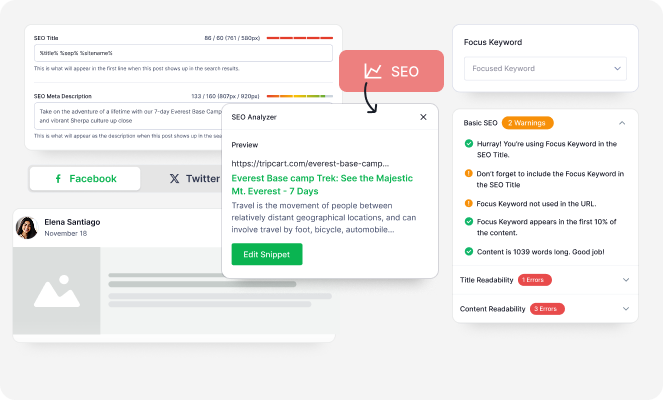
Advanced SEO Content Analysis
Set how each tour appears in online search results to attract more clicks.
⤷ Add SEO Title & Meta Description
Add SEO Title & Meta Description
When people search online, they see a title and a short description for each website. The meta title is the clickable headline, and the meta description provides a brief summary of the page.
With Tripcart, you can easily add custom meta titles and descriptions to your pages. This helps your site look better in search results and attract more clicks from potential travelers.
⤷ Focus Keywords & Optimization Guidelines
Focus Keywords & Optimization Guidelines
A Focus Keyword is the main word or phrase you want a page to rank for in search engines.
With Tripcart, you get basic tips to help improve your content based on that keyword.
You’ll see helpful details like how often the keyword appears, total word count, use of headings, and more. These tips make it easier to create well-structured pages.
⤷ Social Sharing Meta (Title & Description)
Social Sharing Meta (Title & Description)
Control how your tour pages appear when shared on social media platforms like Facebook, Instagram, X, and LinkedIn. Set a custom title, description, and image to make your links more appealing and boost clicks.
Crawling & Indexing Tools
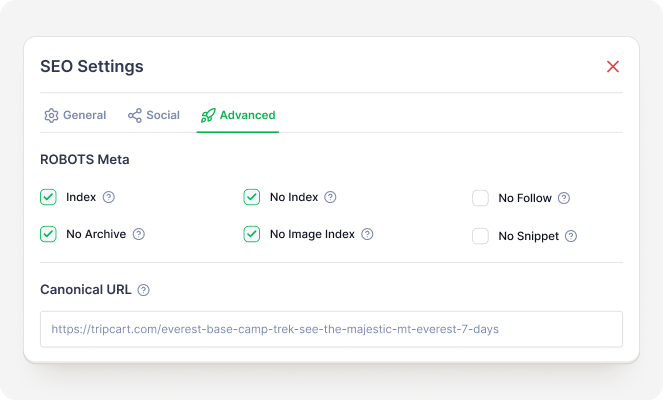
Crawling & Indexing Tools
Crawling is when search engines scan your website to find new content. Indexing is when they save and show that content in search results. With Tripcart, you can control which pages search engines can see (index or noindex) and which links they can follow (follow or nofollow). This helps you improve your site’s visibility and manage what shows up in search results.
Schema-Validated Tours
Schema-Validated Tours
Schema is a small code that tells search engines what your content means, not just what it says. It helps search engines show rich snippets like ratings, prices, reviews, etc., in search results.
With Tripcart, you can just create a tour, and the schema is automatically added for you. No setup needed, no technical work required.
Core Web Vitals Optimized
Core Web Vitals Optimized
Core Web Vitals are a set of rules from Google that measure how fast and smooth your website feels. They check how quickly your site loads, how fast it reacts, and how stable it looks while loading.
All sites built with Tripcart are optimized for Core Web Vitals. Your website offers a better user experience by loading faster and working smoothly on all devices.
Smart URL Redirects
Smart URL Redirects
Keep your SEO intact and avoid broken links when you change a page URL. Tripcart automatically sets up a redirect from the old link to the new one. You can also add your own custom redirects at any time. This ensures a smooth browsing experience and keeps your SEO intact.
Language & Localization
Built-In Translation
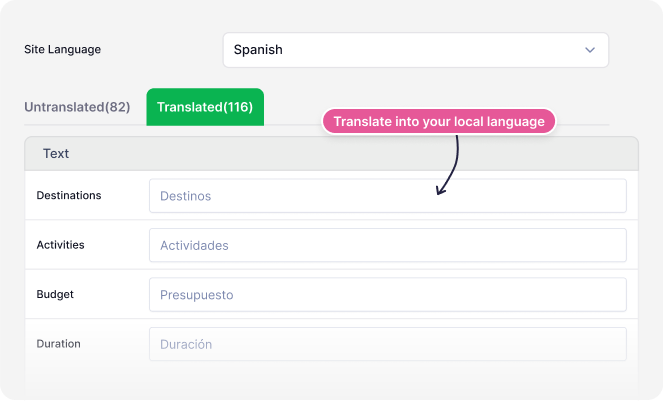
Built-In Translation
Make your tours easy to understand in any language. You can add your own translations for global or local travelers. More clarity = more bookings.
Multilingual Websites (Google Translate Integration)
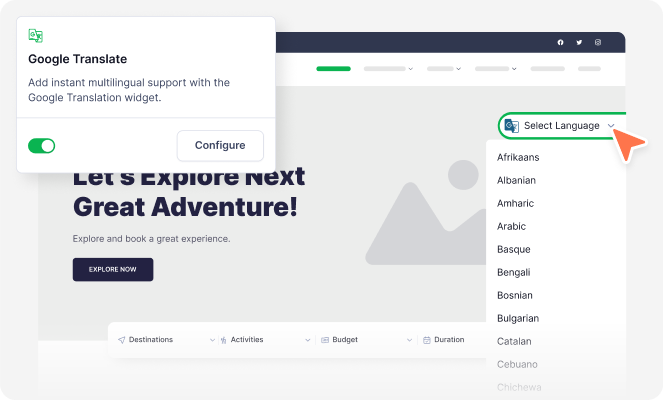
Multilingual Websites (Google Translate Integration)
Built-in one-click translation for over 130 languages with Google Translate. Let travelers explore your tours in their own language. Reach more people and get more bookings.
Lead Generation & Marketing
Show Customer Reviews (Tripadvisor, Google Review, Trustpilot)
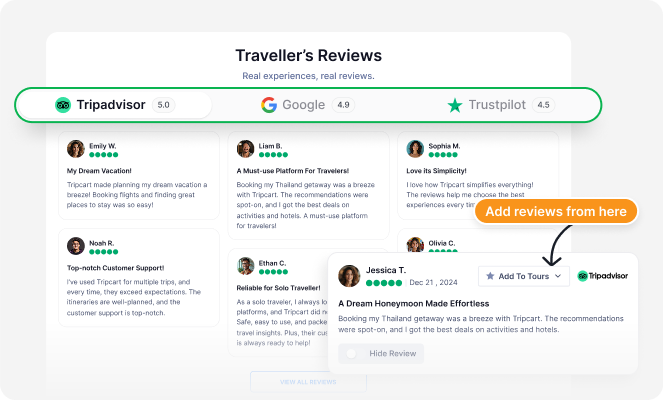
Show Customer Reviews (Tripadvisor, Google Review, Trustpilot)
Travelers are more likely to book your tours when they see positive reviews about you. Build trust with new travelers by displaying genuine customer reviews on your website. You can display reviews from trusted sources, like Google, TripAdvisor, and Trustpilot.
Booking Leads Management
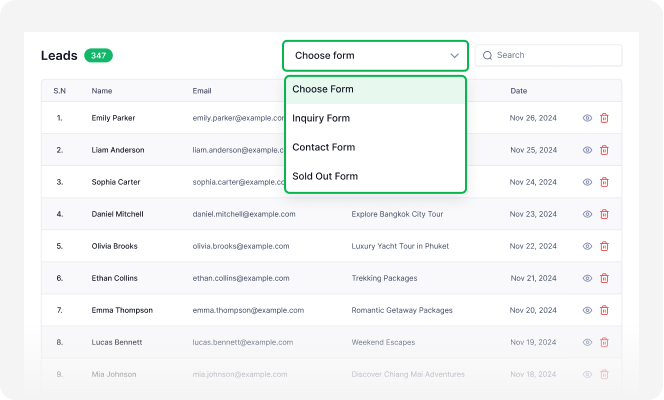
Booking Leads Management
Follow up faster and never miss an inquiry. All your lead forms and messages are stored in one place to help you convert more leads into bookings.
Customer Management
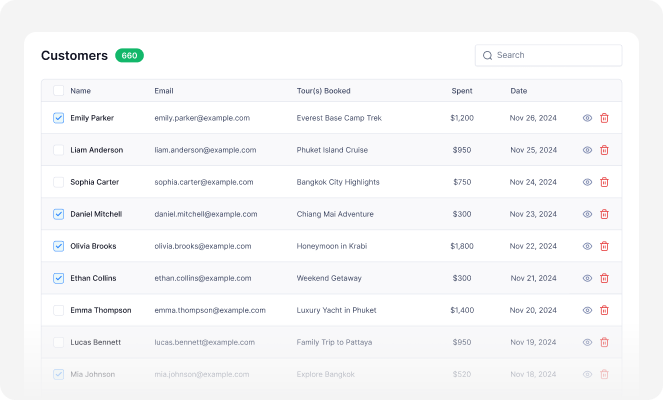
Customer Management
Deliver better service and build stronger relationships with each traveler. You can view and manage each customer’s details, booking history, and contact info from one place.
Customer Dashboard
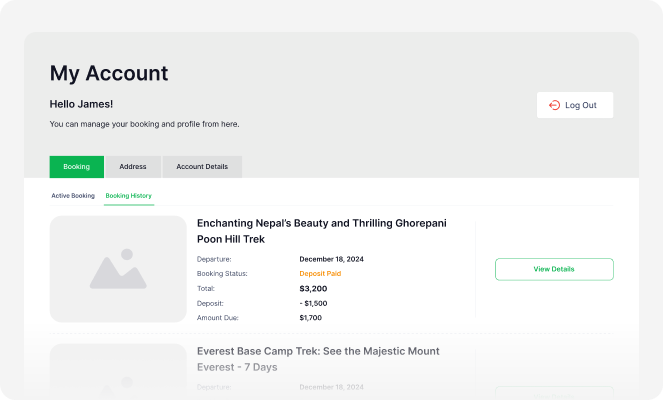
Customer Dashboard
Give your customers a clear view of all their bookings, payments, and tour details in one place. It’s easy for them to track everything on their own, saving you time on back-and-forth messages.
Lead Generation Form Builder
Lead Generation Form Builder
You can create lead forms and generate leads for your tour.
⤷ Tour Inquiry Lead Form
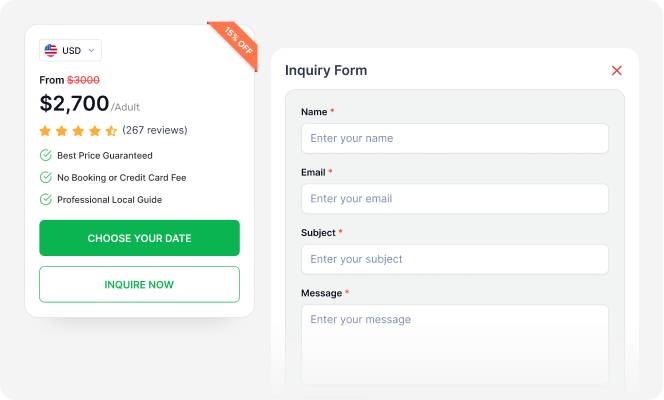
Tour Inquiry Lead Form
Add inquiry forms to each tour so guests can ask questions before booking.
⤷ Tour Sold Out Lead Form
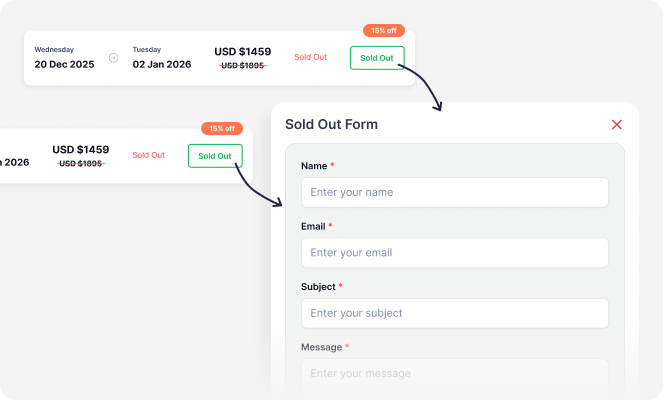
Tour Sold Out Lead Form
Capture leads even when a tour is full. Let them join a waitlist.
⤷ Contact Lead Form
Contact Lead Form
Collect traveler details using a simple form to follow up and turn interest into bookings.
WhatsApp Integration
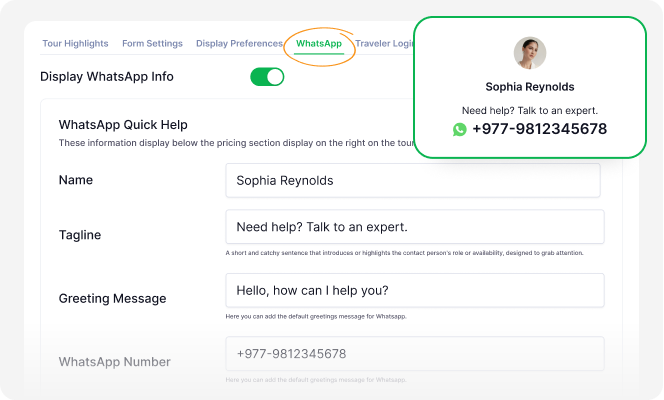
WhatsApp Integration
Let travelers contact you instantly through WhatsApp. With just one click, they can ask questions or get more details. No need to copy numbers or switch apps! It’s fast, simple, and helps you close bookings faster.
Automated Email Notifications
Prebuilt Email Templates
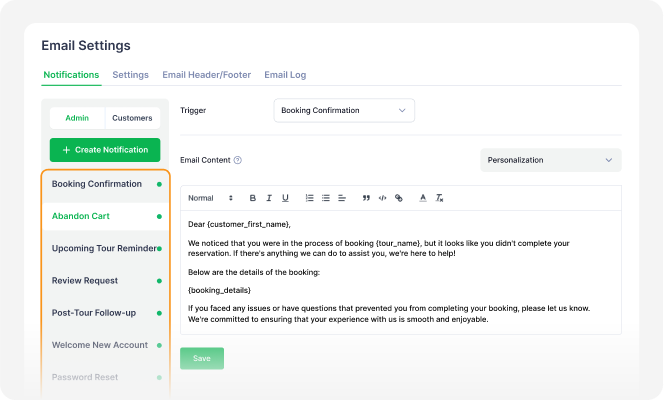
Prebuilt Email Templates
Automate customer communication with ready-to-use email templates. This helps you save time, avoid manual follow-ups, and make sure travelers receive the emails at the right time. Automated emails also reduce errors and give your business a more professional touch. You can automate emails for:
- Booking Confirmation
- Abandoned Cart
- Upcoming Tour Reminder
- Review Request
- Post-Tour Follow-up
- Welcome New Account
- Password Reset
- Payment Due Reminder
⤷ Booking Confirmation
⤷ Abandoned Cart Recovery
⤷ Upcoming Tour Reminder
⤷ Review Request
⤷ Post-tour Follow-up
⤷ Payment Due Reminder
Create New Email Notifications
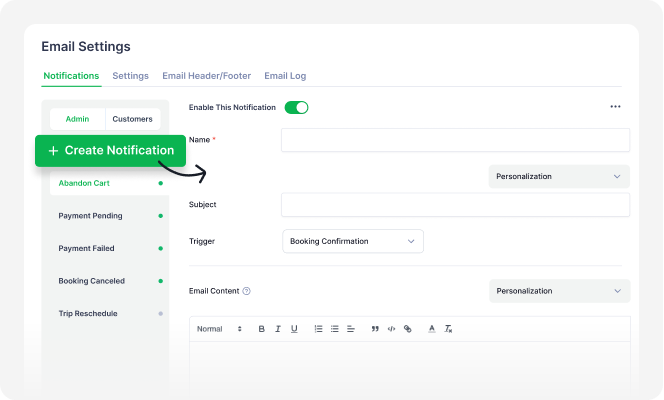
Create New Email Notifications
You can create new automated emails or customize existing ones to match your brand. Stay in touch with travelers whenever you want. It saves time, maintains consistent communication, and enhances the overall customer experience.
Use Your Own Email to Send Notifications (SMTP)
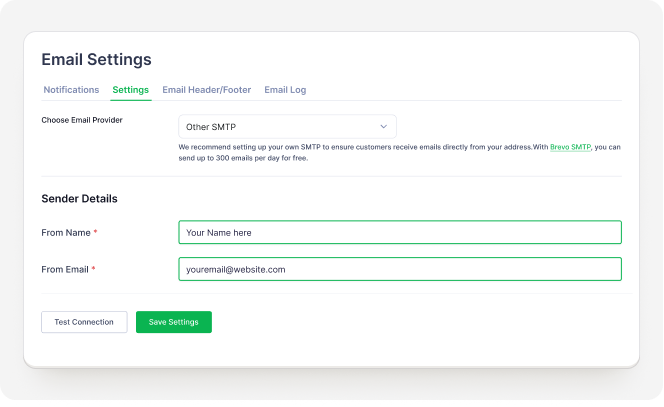
Use Your Own Email to Send Notifications (SMTP)
Send all booking and tour-related emails from your own email address instead of a Tripcart domain. Make your messages look more professional and trustworthy to your customers.
Add Your Own Header & Footer
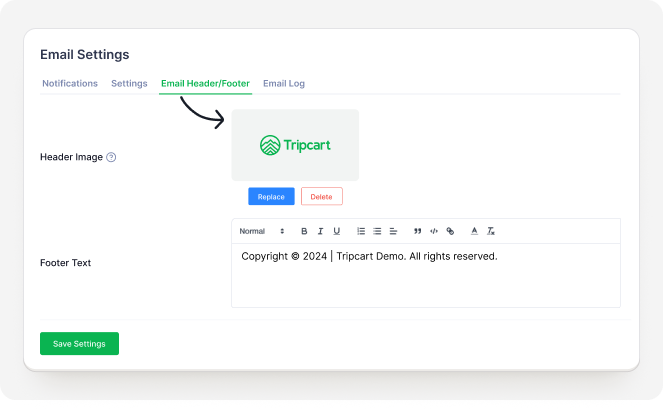
Add Your Own Header & Footer
You can add your brand logo and contact info to the header and footer of your email. Customize every email so travelers recognize and remember your brand.
Reporting & Customer Insights
Detailed Booking Reports
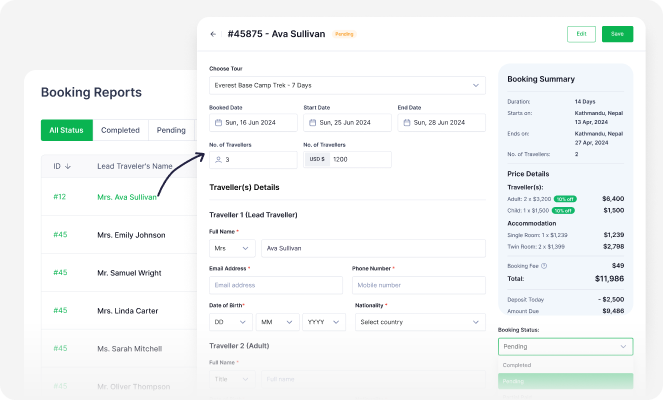
Detailed Booking Reports
Easily manage all your bookings in one place. See traveler details, payment status, and travel dates at a glance. Whether the tour is completed, upcoming, or canceled, you’ll have full visibility to stay organized and in control.
Upcoming Tours
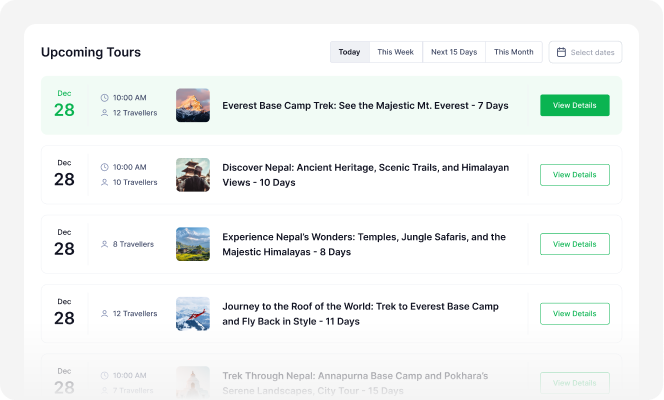
Upcoming Tours
Stay organized with a clear list of all tours scheduled to start tomorrow, this week, or this month. Track these tours all from one place to plan and avoid last-minute surprises.
Latest Bookings
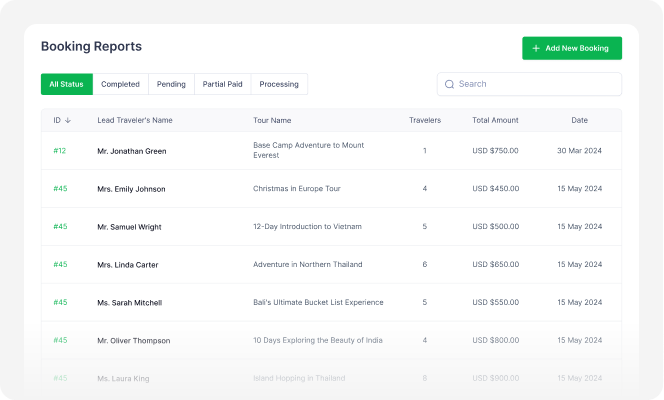
Latest Bookings
See all your newest bookings in a simple list. This helps you track your sales and manage bookings as soon as they happen.
Offline Booking
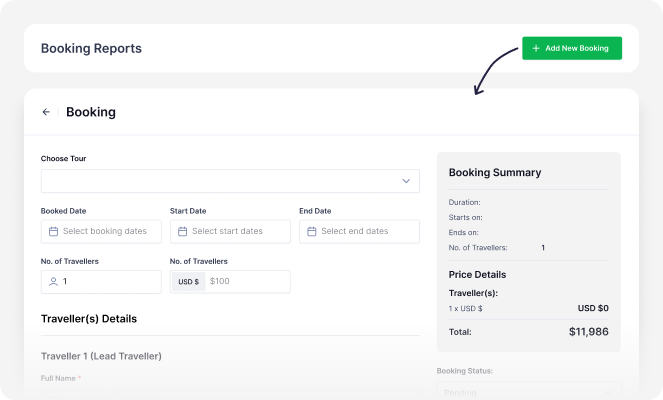
Offline Booking
Manage bookings made in person, over the phone, or through other offline methods. You can add details manually for each booking to help organize everything in one place. Tripcart doesn’t charge any fees for offline bookings, letting you keep 100% of your revenue.
Advanced Payment Gateways
PayPal (Global)
PayPal (Global)
US, UK, Europe, Australia, and parts of Asia. Full list of supported countries.
Stripe (US, EU & AUS)
Stripe (US, EU & AUS)
North America, Western Europe, Australia, and expanding in Asia. Full list of supported countries.
Revolut (UK, EU & US)
Revolut (UK, EU & US)
UK, EU & US. Full list of supported countries.
Cybersource (US & EU)
Revolut (UK, EU & US)
US, Europe, and large global businesses. Full list of supported countries.
Razor Pay (India)
Red Dot Payment (Singapore, Indonesia, Thailand)
Authorize.Net (US & Canada)
Midtrans (Indonesia)
Getnet (Chile, Brazil, Mexico, Argentina, Uruguay, Spain, and Portugal)
Xendit (Indonesia, Philippines, Malaysia, Thailand and Vietnam)
Nabil Bank (Nepal)
Himalayan Bank (Nepal)
Global IME (Nepal)
New Payment Gateway Request
New Payment Gateway Request
You can request new payment gateways for your tour booking website. Tripcart already offers tons of popular gateways, but we can always add more if you need them.
User Access & Security
User Access
User Access
Get help managing your tours, bookings, and website content by inviting team members to work together. You can give staff access so they can handle tasks themselves. This makes the workflow faster and more efficient.
3
8
25
Role-Based Permissions
Role-Based Permissions
Keep your website secure and organized by controlling what each user can access. Role-based permissions allow you to grant access to only the tools and information they need. This reduces errors and protects sensitive data.
reCaptcha Protection
reCaptcha Protection
ReCAPTCHA is a tool that checks who is filling out your forms, a person or a bot. Your forms are protected against bots and hacking attempts with Google reCAPTCHA. It helps keep your site safe from spam, fake bookings, and malicious activity.
SSL Encrypted Websites
SSL Encrypted Websites
SSL is a safety feature that creates a secure connection between your website and your visitors. Websites built with Tripcart are protected with SSL encryption. This means all customer data, like bookings and payments, is safe and secure.
Cookie Consent Banner
Cookie Consent Banner
GDPR is a European law that requires websites to ask permission before collecting information like browsing activity. A cookie consent banner helps you follow this law. It asks visitors if they agree to the use of cookies. This builds trust, keeps your site legal, and shows that you respect your visitors’ privacy.
Integration
API Keys
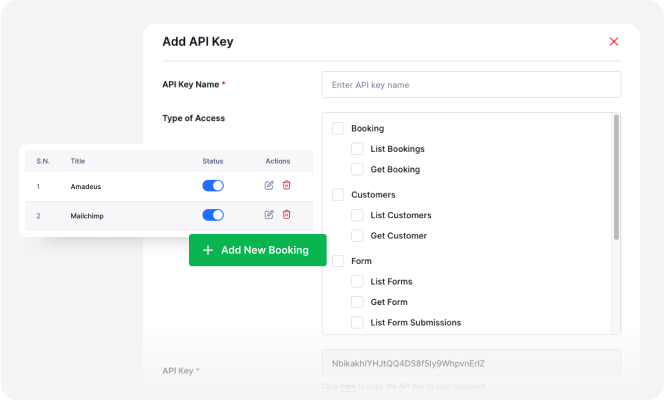
API Keys
An API key is a bridge that lets your website share data with external tools you use. For example, you can use API keys to pull booking, customer, or payment data from your website to Google Sheets whenever you need it. This lets you safely connect Tripcart with external platforms or build your own workflows.
Webhooks
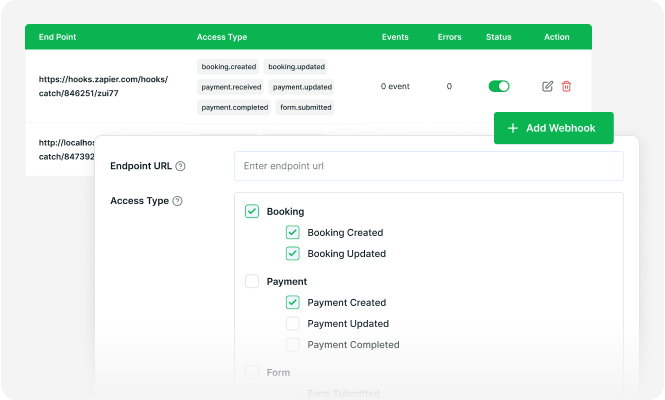
Webhooks
A webhook is like a messenger that sends your website data to other tools the moment something happens. For example, when a booking is made, your website can push the details straight to HubSpot or Xero. This keeps external platforms updated in real time without you doing anything.
Help & Resources
Dedicated Customer Support
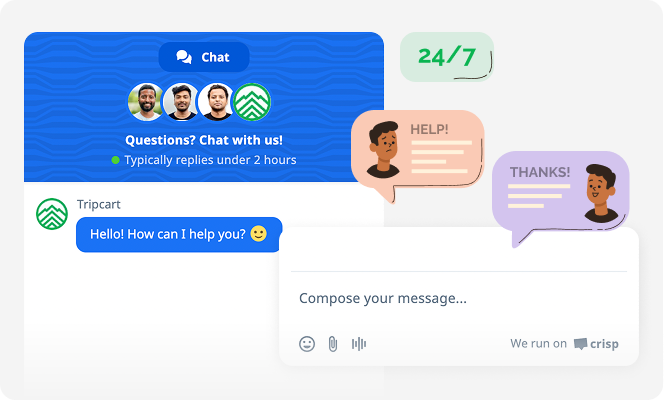
Dedicated Customer Support
Message Tripcart support anytime for help — we’ve got your back.
How-to Video Guides
How-to Video Guides
Watch quick video tutorials that show you how to set up and grow with Tripcart.
Detailed Documentation
Detailed Documentation
Step-by-step written guides for every feature. When new features are added, their documentation will also be available.
Access to Tripcart Facebook Community
Access to Tripcart Facebook Community
Connect with other tour operators and stay up-to-date on new features.
FAQs
Website & Customization ➝
Can I use my own domain with Tripcart?
Absolutely. You can use your own domain for your website. Your site can appear as yourcompany.com instead of yourcompany.ontripcart.com.
This will help your brand look more professional, build trust with visitors, and stay memorable. Connecting your domain is simple. We provide step-by-step instructions if you need any help.
Does Tripcart charge commissions or booking fees?
No. Tripcart does not charge any platform booking fees, commission fees, or any other hidden fees. You keep 100% of your bookings. The only payment is a subscription fee that you can pay monthly or annually.
What is a Traveler Fee?
A Traveler Fee is an extra charge you can add to the total price of your tours. Please don’t confuse it with any commission or extra fees.
It is entirely optional, and you keep 100% of it. You can use the Traveler fees to cover the 1.5 to 3% payment gateway fees or tax amounts. This helps add to your revenue without losing money to processing costs.
You can also use Traveler fees to cover expenses for services and handling, local taxes, third-party costs, convenience fees, and more. It’s an easy way to protect your earnings without raising your main tour price.
What payment gateways are supported by Tripcart?
Tripcart currently supports the following payment gateways:
- PayPal (Global)
- Stripe (US, EU & AUS)
- Revolut (UK, EU & US)
- Cybersource (US & EU)
- Razor Pay (India)
- Authorize.Net (US & Canada)
- Midtrans (Indonesia)
- Xendit (Indonesia, Philippines, Malaysia, Thailand and Vietnam)
- Nabil Bank (Nepal)
- Himalayan Bank (Nepal)
- Global IME (Nepal)
Check out our full, updated list of supported payment gateways.
Can I request a payment gateway?
We are always looking to add new and popular payment gateways to Tripcart. Please fill out the payment gateway request form, and we will get back to you.
How do I receive payments for my bookings?
You will need to connect your payment gateway account to Tripcart to receive payments for your bookings.
From your Tripcart dashboard, go to Payment Gateway settings, select a payment gateway from the list (such as PayPal, Stripe, or Revolut), enter your credentials, and your account is linked. Once connected, all tour payments go directly into your payment gateway account.
Tripcart doesn’t collect, hold, or route any payments. We don’t take a cut, commissions, or charge any hidden fees at all. What customers pay is what you receive.
What are your credit card fees?
Tripcart does not charge any credit card fees or transaction fees. However, the payment gateway you choose to connect to your website (such as PayPal, Stripe, or Revolut) may charge its own processing fees.
These typically range from 1.5% to 3.5% of the total price, depending on the provider and your location. These fees are charged by the payment gateway, not Tripcart.
Is there a limit to the number of tours I can create with Tripcart?
Not at all! With every Tripcart plan, you can create an unlimited number of tour experiences.
You have the freedom to offer as many unique travel experiences as you want. This gives you complete flexibility to expand your offerings, experiment with new ideas, and grow your business.
Are there tools to help recover abandoned bookings?
Yes! Tripcart has a built-in Abandoned Cart Recovery tool available on all plans.
Customers who abandon their booking are automatically sent a recovery email. At the same time, you (admin) will receive an email with their booking details, including their email address and phone number. You can use this to directly follow up with customers with unfinished bookings via phone and help recover the sale.
Industry research shows that such email notifications achieve recovery rates of between 10% and 15% of lost sales. That means, out of every 100 customers who abandon their bookings, you’re able to recover 10-15 of them.
Can I set different prices for peak season and off-season?
Absolutely! You can set seasonal prices for your tours based on seasonality and demand. Charge higher prices during peak seasons and offer lower rates during off-season periods.
This flexibility helps you grow revenue year-round while keeping tours appealing and competitive. All pricing updates happen automatically based on the rules you set. No manual changes needed each time the season changes.
Can I receive upfront payment for bookings made on my website?
Yes! You can receive upfront payment for your tours with Tripcart.
The Upfront Payments feature allows you to accept deposit payments from your customers before the tour starts. Customers don’t need to pay the full amount upfront, which makes it easier for them to book. This helps increase booking conversions. At the same time, collecting a deposit means you’re less likely to deal with no-shows.
Prefer not to receive payments in advance? You can create tours that require no upfront payments. Attract travelers with tours that they can book and pay for later.
Can I set up automated emails for my customers?
Absolutely! You can set up fully branded automated emails to be sent to customers. You can even add your header logo and custom footer text, and send emails through your own email.
You can also decide which emails go out automatically and when. You can personalize and set up emails like:
- Booking Confirmations
- Abandoned Cart Reminders
- Tour Reminders
- Review Requests
- Post-tour Follow-ups
- Payment Due Alerts
Every email can be customized to match your brand voice and style. This way, your communication stays consistent, professional, and on-brand.
Plans & Pricings ➝
What is the main difference between the Growth, Accelerate, and Scale plans?
Growth is perfect if you’re starting out as a solo tour entrepreneur or are running a small tour business. It includes all the essentials to get your business online, like a website builder, booking engine, and itinerary builder.
Accelerate is for you if you want to grow revenue faster and without much effort. It includes everything in Growth, as well as upsell features to increase your Average Order Value (AOV). These include accommodation upgrades, extra services, multiple packages, promo codes, upfront payments, etc.
Scale is built for established businesses with larger teams. You’ll get everything in Accelerate, along with the ability to remove Tripcart branding from your website footer.
How does the free trial work on Tripcart?
It’s simple. When you sign up, you get full access to Tripcart, free for 30 days. You can explore all the features, build your tour website, and see how it works for your business.
After the trial ends, you can choose a plan to keep your site live. No credit card is needed to start.
What happens to my content when the free trial expires?
When your 30-day free trial ends, you’ll get a reminder to choose a paid plan to keep your site live. But don’t worry, your content won’t be deleted. Everything you’ve built so far, including your tours, media, and settings, will remain safely stored.
However, your site will go into a paused state. This means you won’t be able to receive new bookings or make any edits until you upgrade to a paid plan.
Once you choose a plan, your site will be reactivated, and you can pick up right where you left off.
Can I upgrade or downgrade my subscription plan?
Absolutely! You can upgrade or downgrade your plan at any time based on your business needs.
If you upgrade, you only pay the extra amount for the days left in your current billing cycle. If you downgrade, the new, lower plan will take effect from your next billing cycle. There are no long-term contracts, so you can switch plans whenever your business needs change.
Will my content be lost if I downgrade?
No. Your content will stay the same even if you downgrade to a lower-tier subscription. All your tours, pages, media files, and customer data will remain safe and untouched.
However, any premium features from your previous plan (such as storage capacity, deposit payment, multi-package, accommodation upgrade, promo code, etc) will be locked until you upgrade again. You can re-enable them anytime by switching back to a higher plan.
What happens if I exceed the limits of my plan?
No worries! If you reach the limits of your current Tripcart plan, like media storage or user access, we’ll notify you right away. You won’t lose access to your site or features; nothing will suddenly stop working.
We’ll guide you through your upgrade options so you can choose a plan that better fits your growing business. Upgrading is quick and seamless, with no interruptions to your website or bookings.
Multilingual, SEO & Migration ➝
Can I translate my website?
Yes. You can easily translate your website into your preferred language with built-in translations. This makes your site more familiar and welcoming to local travelers or users who are familiar with the selected language. The built-in translation is available on all plans and doesn’t require any coding or third-party tools.
Can I have my website in multiple languages?
Absolutely! With the Google Translate integration, you can make your website accessible in multiple languages. This allows travelers to view your site in their preferred language with just a click. It’s a simple way to reach international users without needing to create separate sites for each language.
What tools does Tripcart offer that help improve SEO on my tour website?
Tripcart comes with built-in SEO tools to help your website appear higher in search results.
Your site is designed to be fast, mobile-friendly, and easy for search engines to read. This means it will load quickly, look good on any device, and have the proper structure for better visibility. You also get full control over SEO settings like titles, descriptions, sitemaps, and indexing options.
Plus, you also get advanced content analysis for your tours. You can add SEO-focused keywords and edit your content with helpful tips to improve your tour pages.
Your website will also be schema-ready. This enables search engines to display rich snippets, such as reviews and prices, for your tours in search results. With such information available at a glance, your tours are likely to be clicked on more.
Will I lose my SEO rankings if I migrate my website to Tripcart?
No. You won’t lose your SEO rankings when moving your site to Tripcart. We have even seen improved search engine results after migration to Tripcart.
Our team is highly experienced in SEO, with over a decade of expertise in helping travel agencies build SEO-friendly websites. We make sure that nothing gets left out and your migrated content looks the same.
Your meta titles, descriptions, URLs, and other important SEO settings are preserved during the move. You can even set up smart redirects to make users and search engines find the right pages if your links change.
To give you extra peace of mind, we also offer free SEO migration checkups. You can contact our support team to ensure everything works as expected before your site goes live.
Can I migrate my existing websites to Tripcart?
Absolutely. You can easily move your existing website to Tripcart. You can even do it yourself.
And if you need further assistance, our friendly support team is here to help you every step of the way. We’re just a message away.
If you are using WordPress and WP Travel Engine (WordPress Tour booking plugin), you can easily migrate to Tripcart with the built-in migration tool.
However, if you need help with the move, we can help ensure that everything on your site remains the same (SEO settings, content, etc.).
We have helped countless customers migrate their websites to Tripcart. We will handle the setup and migration for a one-time setup fee.
Is my website safe and secure with Tripcart?
Yes. Your website comes with SSL encryption (that’s the little padlock in the address bar) and reCAPTCHA protection to keep your data secure.
We maintain multiple backups of Tripcart in case of any unexpected issue. If something goes wrong, we can easily recover the site with minimal effort.
Is my data (personal and customer) safe with Tripcart?
Of course! We take your privacy and data security very seriously. We keep your data safe with regular security updates, server monitoring, and strong privacy practices.
Sales Growth & Support ➝
How can I grow my revenue using Tripcart?
You can grow your revenue with Tripcart using its built-in upselling features.
Firstly, you can enable Upfront Payments for your tours. This gives you security over no-shows and last-minute cancellations. You can offer Add-ons and Extra Services with each tour, such as airport pickup and drop-off, private guides, and additional tickets.
You can also add Accommodation Upgrades, such as 5-star hotels, tea house rooms, or hostels, for the same tour. Additionally, with the Multiple Package feature, you can offer the same package at different prices, such as Budget-friendly, Standard, Premium, and VIP.
Moreover, you can also create Group Discounts and Promo Codes for your tours. This attracts more users to your tours and helps keep seats full. These upsells provide your customers with more choices, helping to increase your Average Order Value (AOV).
I have a few questions before I sign up. Can someone help me out?
Of course! Our friendly pre-sales support team is here to help figure out if Tripcart is the right fit for you. Just reach out through the website chat or email, and we’ll walk you through anything, pricing, features, setup, or what plan works best for you.
What kind of support will I get after signing up?
Once you’ve signed up for Tripcart, you’re never on your own. We offer in-app chat support, easy-to-follow video tutorials, and step-by-step documentation. Whether you’re launching your website or making updates, our support team is just a click away.
How often are new features added to Tripcart?
New features and updates are added to Tripcart every month. Our team is always working hard to bring you the most valuable features and improvements to existing ones.
I want a specific feature on my website. How do I request it?
You can request any feature to be added to Tripcart by contacting our support team. You can also check our public roadmap to see planned and upcoming features.
If a feature gets enough requests from other users like you, it’s prioritized and we build it. Your feedback directly shapes what we build next.

Still have questions?
Can’t find the answer you’re looking for? Please chat with our friendly team.
Book a Demo